Intel® Integrated Performance Primitives
Production-ready building blocks for cross-platform performance. Develop high-performance vision, signal, security, and storage applications with this multithreaded software library.
Multimedia and Data Processing Performance
Intel® Integrated Performance Primitives (Intel® IPP) is an extensive library of ready-to-use, domain-specific functions that are highly optimized for diverse Intel architectures. Its royalty-free APIs help developers:
- Take advantage of Single Instruction, Multiple Data (SIMD) instructions
- Improve the performance of computation-intensive applications, including signal processing, data compression, video processing, and cryptography
- Reduce cost and time to market for software development and maintenance
What's New
- Future-proof your cybersecurity applications against cyberattacks from quantum computers using an Extended Merkle Signature System (XMSS) postquantum cryptography algorithm. A technical preview is now available.
- Enhance your security with the Intel IPP cryptography that is in compliance to the US government's Federal Information Processing Standard (FIPS) 140-3, which is ideal for government agencies and industries that handle sensitive data.
- Transfer data faster and reduce storage requirements in large data-intensive applications that use LZ4 v1.9.4 with accelerated lossless compression and decompression speeds.
- Upgrade your existing functions and break free from 32-bit limitations to handle larger data sizes (64-bit) using new platform-aware functions that are seamlessly integrated in the Intel IPP signal domain.
What's Updated
Cryptography
- Eliminated the need for a redundant buffer, increased efficiency and ease of use for API and adoptability, and incorporated new bug fixes for CBC and CFB modes for the SM4 algorithm.
- Expanded offerings with CCM and GCM modes, enabling the cryptographic multibuffer library to provide a greater performance benefit when compared to scalar implementation.
- Added support for the asymmetric cryptographic algorithm SM2 and for key exchange protocol and encryption and decryption APIs, and added other bug fixes and security enhancements.
- Added mitigation for a frequency throttling side-channel attack for the ECB, CMAC, and GCM modes of the AES algorithm.
Image Processing
- Fixed bugs in the planar YCbCr to RGB conversion in Intel IPP image-processing color-conversion functions
Signal Processing
- Extended optimization for multirate finite impulse response (FIR) filtering on Intel IPP signal processing functions
- Fast Fourier transform (FFT) and discrete Fourier transform (DFT) support for the FP16 data type on 4th generation Intel® Xeon® Scalable processors and newer
Data Compression
- Optimizations for a lossless compression method, zlib v1.2.13, in Intel IPP data compression. These new optimizations help improve the quality and speed of compression and decompression in various data compression applications.
Download as Part of the Toolkit
Intel IPP is included as part of the Intel® oneAPI Base Toolkit (Base Kit), which is a core set of tools and libraries for developing high-performance, data-centric applications across diverse architectures.
Download the Stand-Alone Version
A stand-alone download of Intel IPP is available. You can download binaries from Intel or choose your preferred repository.
Develop in the Cloud
Build and optimize oneAPI multiarchitecture applications using the latest Intel-optimized oneAPI and AI tools, and test your workloads across Intel® CPUs and GPUs. No hardware installations, software downloads, or configuration necessary.
Features
Optimized for Performance
These software building blocks are highly optimized using Intel® Streaming SIMD Extensions 2, Intel® Advanced Vector Extensions 2 (Intel® AVX2), and Intel® Advanced Vector Extensions 512 (Intel® AVX-512) instruction sets.
Plug In and Go
With these ready-to-use, royalty-free functions, you will:
- Gain more time to develop new application features
- Reduce development, debug, and maintenance time
- Ensure the code you write today will run optimally on future generations of Intel processors
A Comprehensive Set of Primitives
Access thousands of optimized functions covering frequently used fundamental algorithms, including those for creating:
- Digital media
- Enterprise data
- Embedded communications
- Scientific, technical, and security applications
The library includes more than 2,500 primitives for image processing, 1,300 for signal processing, 500 for computer vision, and 300 for cryptography.
Optimize for great CPU performance in current and future Intel platforms. With each instruction set upgrade, a new implementation layer is added. Previous implementations work as before, but functions that can benefit from new hardware capabilities are updated and validated before new architecture is released.
Unlock increased performance that's delivered with new hardware. Start using new CPU capabilities right away instead of interrupting development cycles for additional optimizations. In most cases, the performance boost is automatic. For other cases, you only need to recompile.
For complete information, see the release notes.
Domains and Workloads
Image Processing
Take visual information and convert it into manageable, usable data for further analysis and decision-making. These image-processing applications use Intel IPP:
- Healthcare (medical imaging)
- Computer vision
- E-commerce (visual search)
- Digital surveillance
- Biometric identification
- Factory machine vision
- Advanced driver assistance systems (ADAS) for autonomous driving
- Printing and printers
- Image recognition and enhancement
- Remote equipment operation
- Gesture recognition
- Illegal image recognition
- Optical correction
Data Compression
Reduce the number of bits needed to store or transmit data. Intel IPP highly optimizes these common compression standards:
- Lempel-Ziv-Storer-Szymanski (LZSS)
- LZ77 (zlib)
- Lempel-Ziv-Oberhumer (LZO)
- Bzip2
- LZ4
- ZFP
Achieve significant performance gains with plug and play functions on applications such as these:
- Internet portal data center
- Data storage centers
- Databases
- Enterprise data management
Signal Processing
Enable information generation, transformation, and interpretation. Pull meaning from broad sources of data, helping modern communications that include:
- Voice recognition
- Biotechnology
- Wearable technology
- Hearing aids
- Speech synthesis
Optimize commonly used signal-processing functions for a wide variety of Intel architectures, including:
- Discrete Fourier transform (DFT)
- Fast Fourier transforms (FFT)
- Convolution
- Filtering
- Statistics
These signal-processing applications use Intel IPP:
- Telecommunications
- Energy
- Ultrasound machines
- Medical scanning
- Record, enhance, and playback audio and non-audio signals
- Echo cancellation: filter, equalize, and emphasis
- Simulation of environment or acoustics
- Games with sophisticated audio content or effect
- Interfaces for voice-controlled personal assistants
Cryptography
Protect against cyberattacks and intrusion in the field of autonomous, self-driving cars with functions for:
- Security analysis
- Threat intelligence
- Mobile security
- Cloud security
- IoT security
- Data integrity and authentication hash (SHA, MD5, SM3)
- Public key cryptography (RSA, ECC, HMAC, CMAC)
- Secure data transfer, such as:
- Symmetric algorithms
- Advanced Encryption Standard (AES)
- Triple DES (TDES)
- SMS4
- Steam ciphers
The cryptography library is available as an open source library. GitHub*
These security applications use Intel IPP:
- Telecommunications
- Transaction security and cybersecurity
- Smart card and wallet interfaces
- ID verification
- Copy protection
- Electronic signature
- Advanced driver-assistance systems (ADAS)
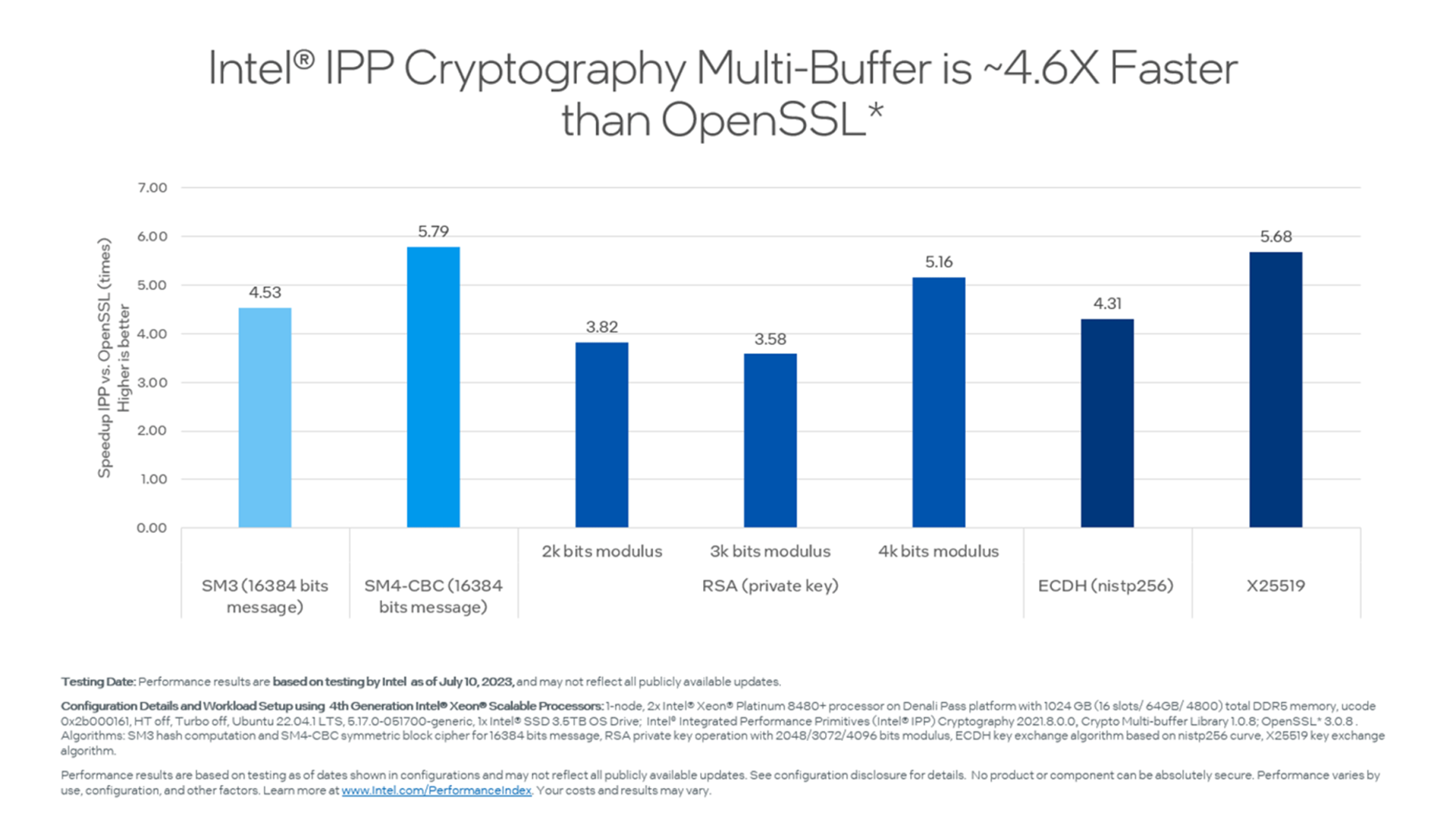
Benchmarks
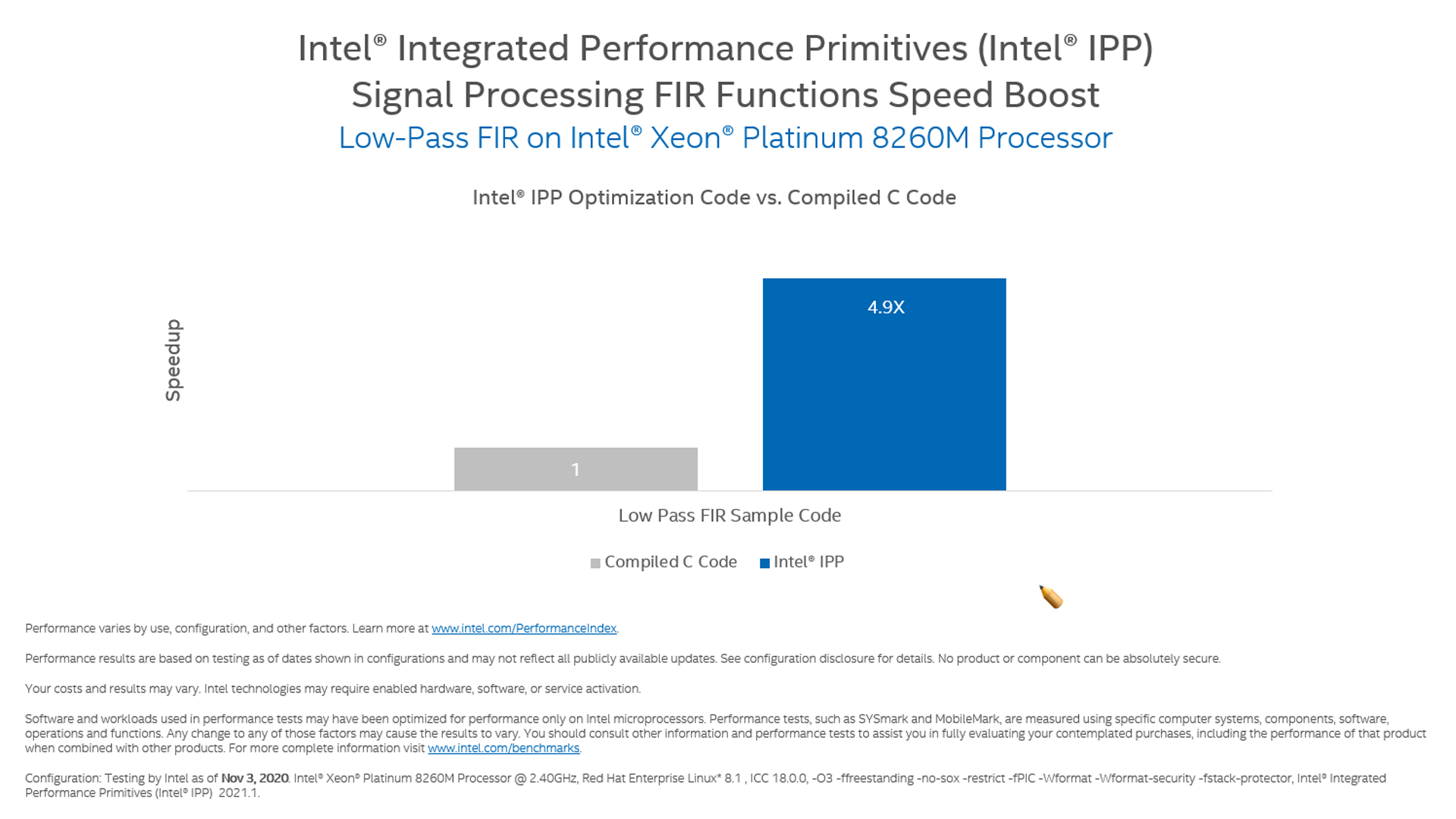
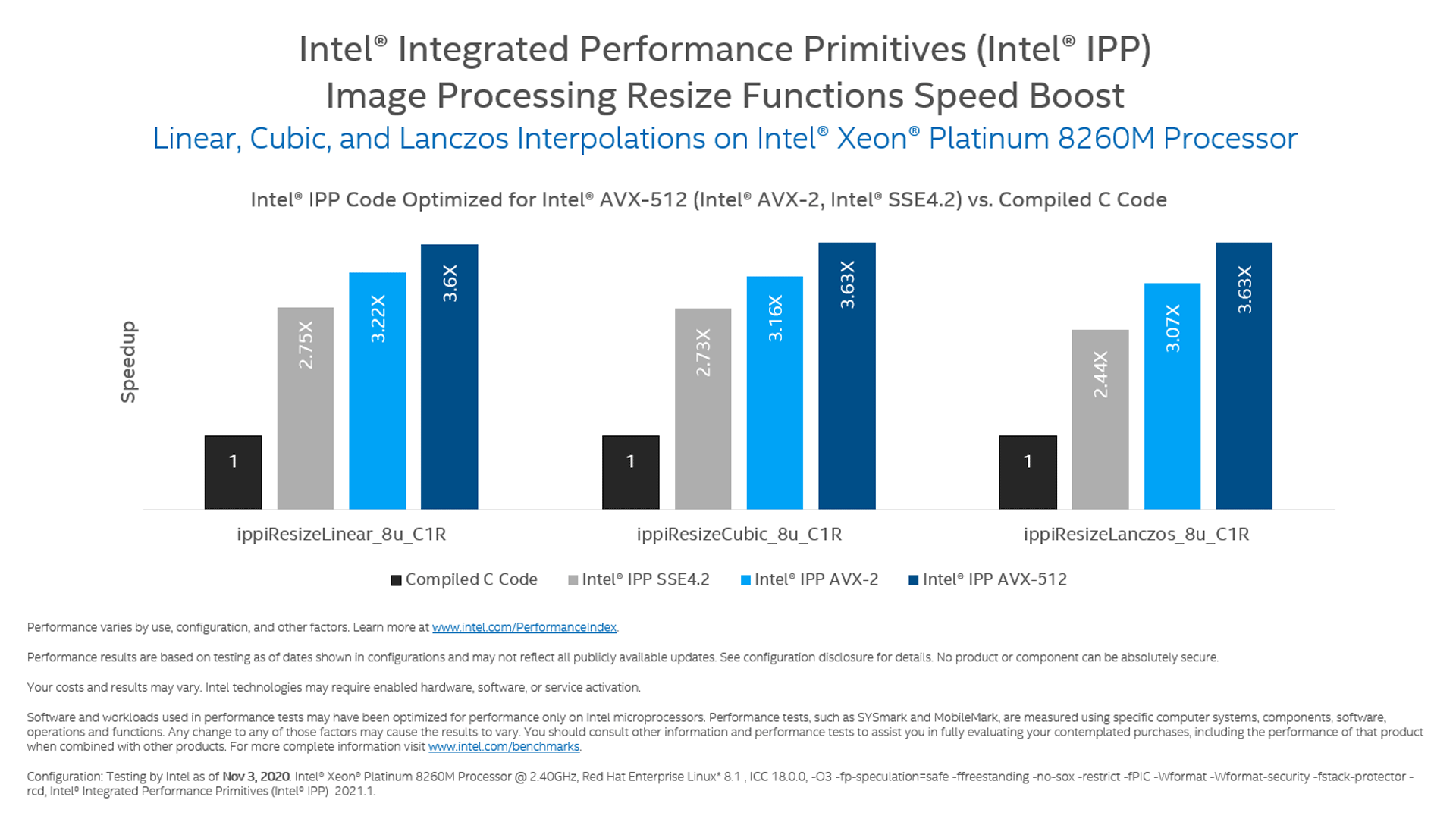
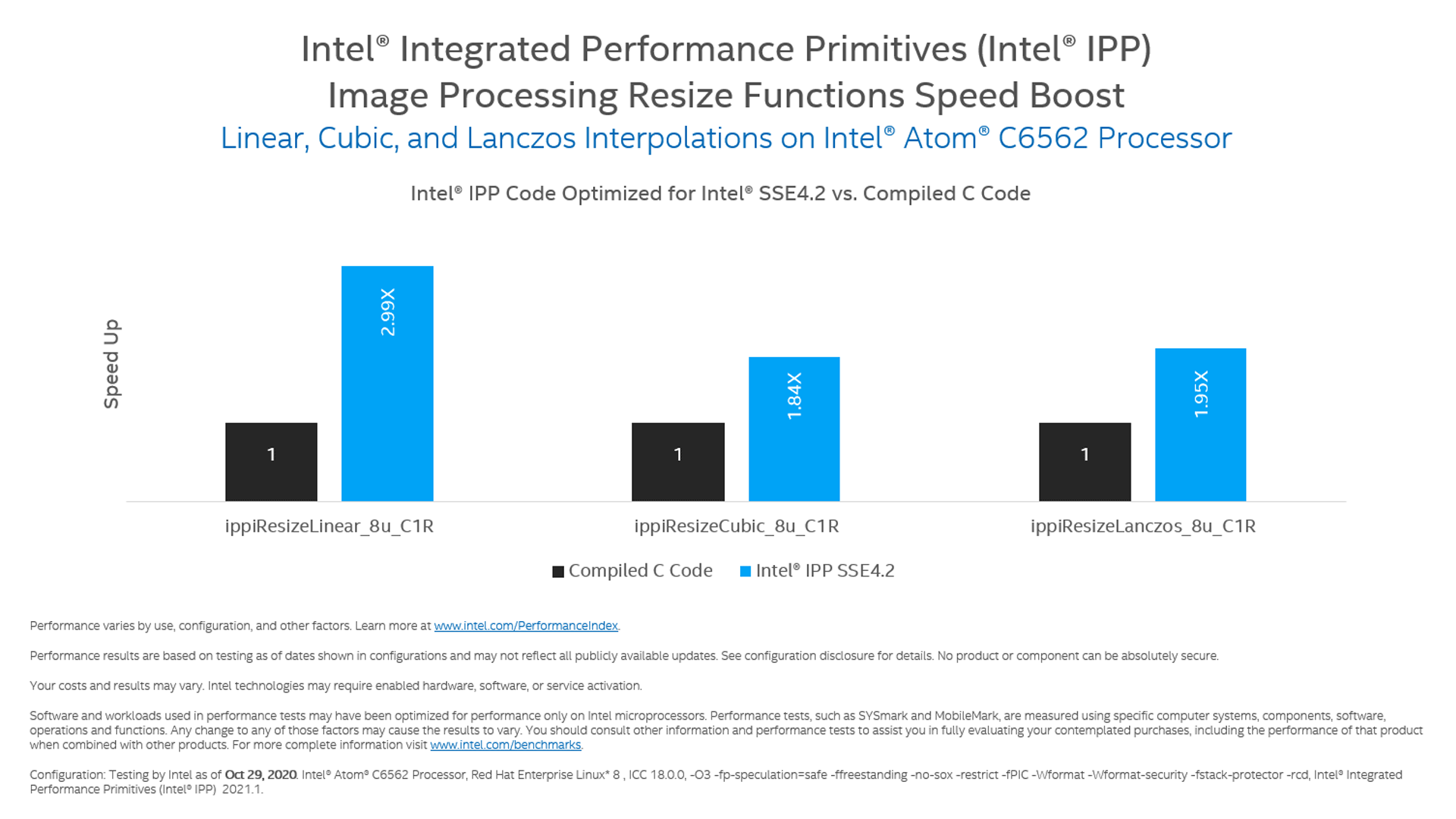
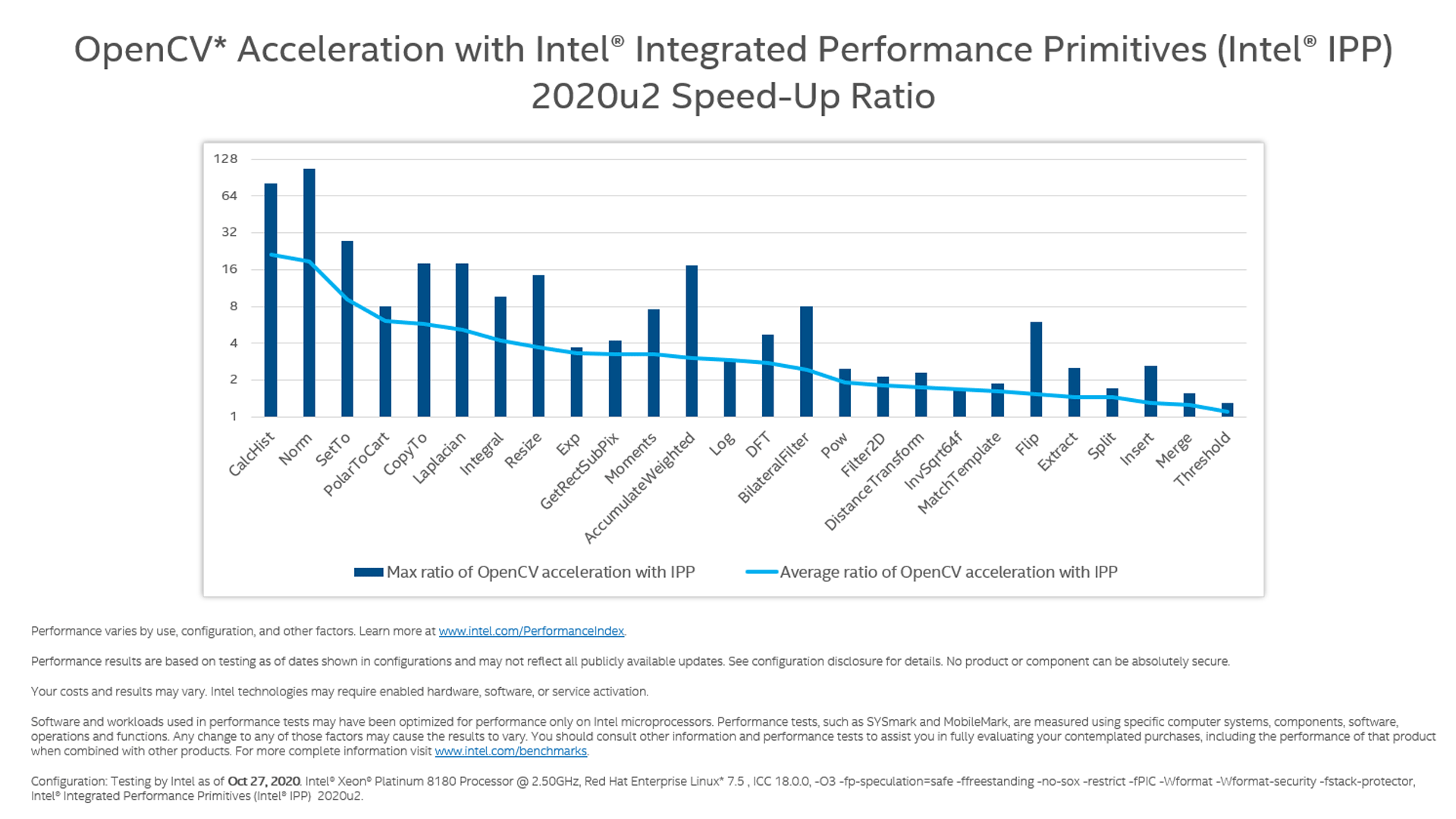
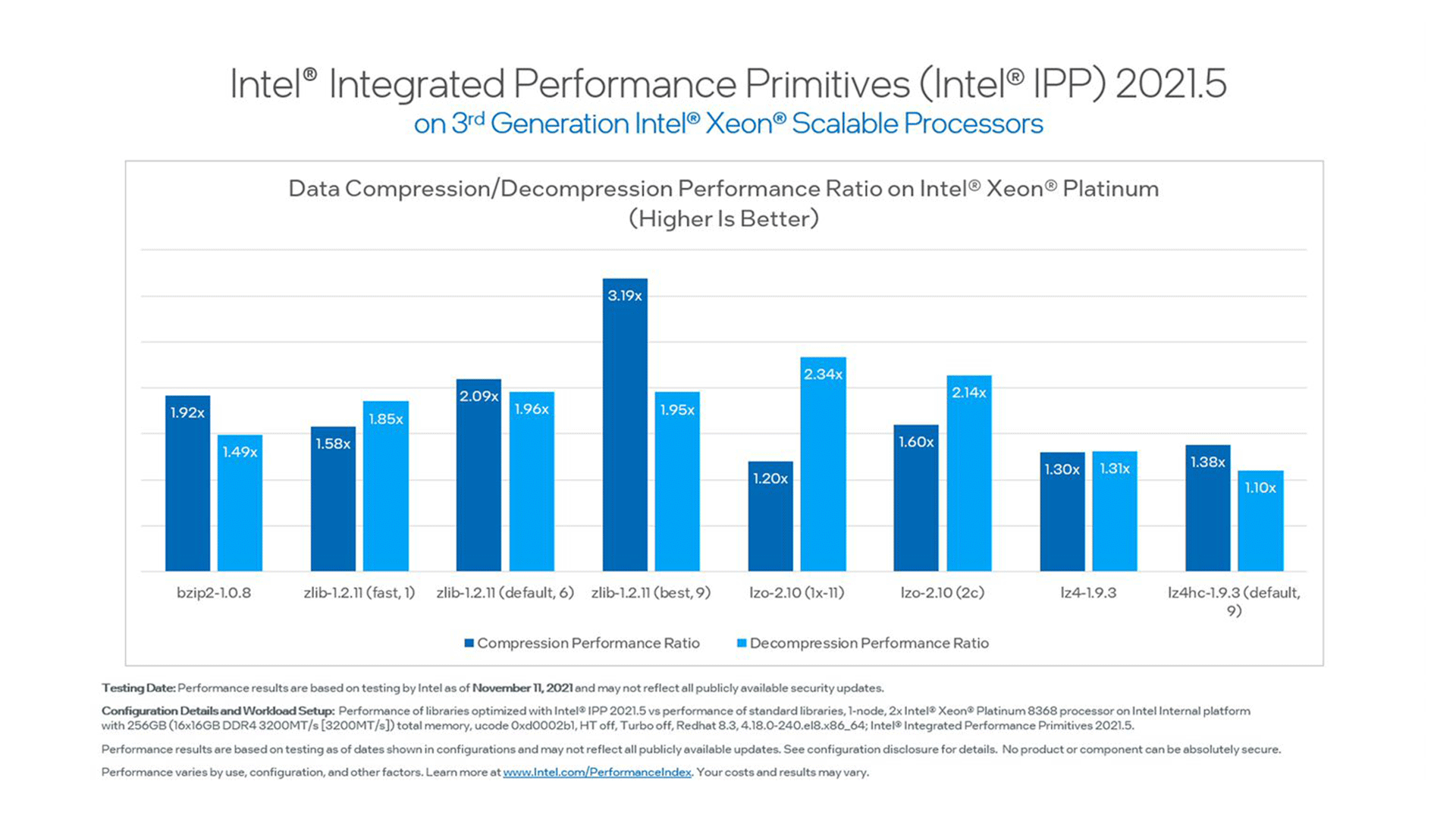
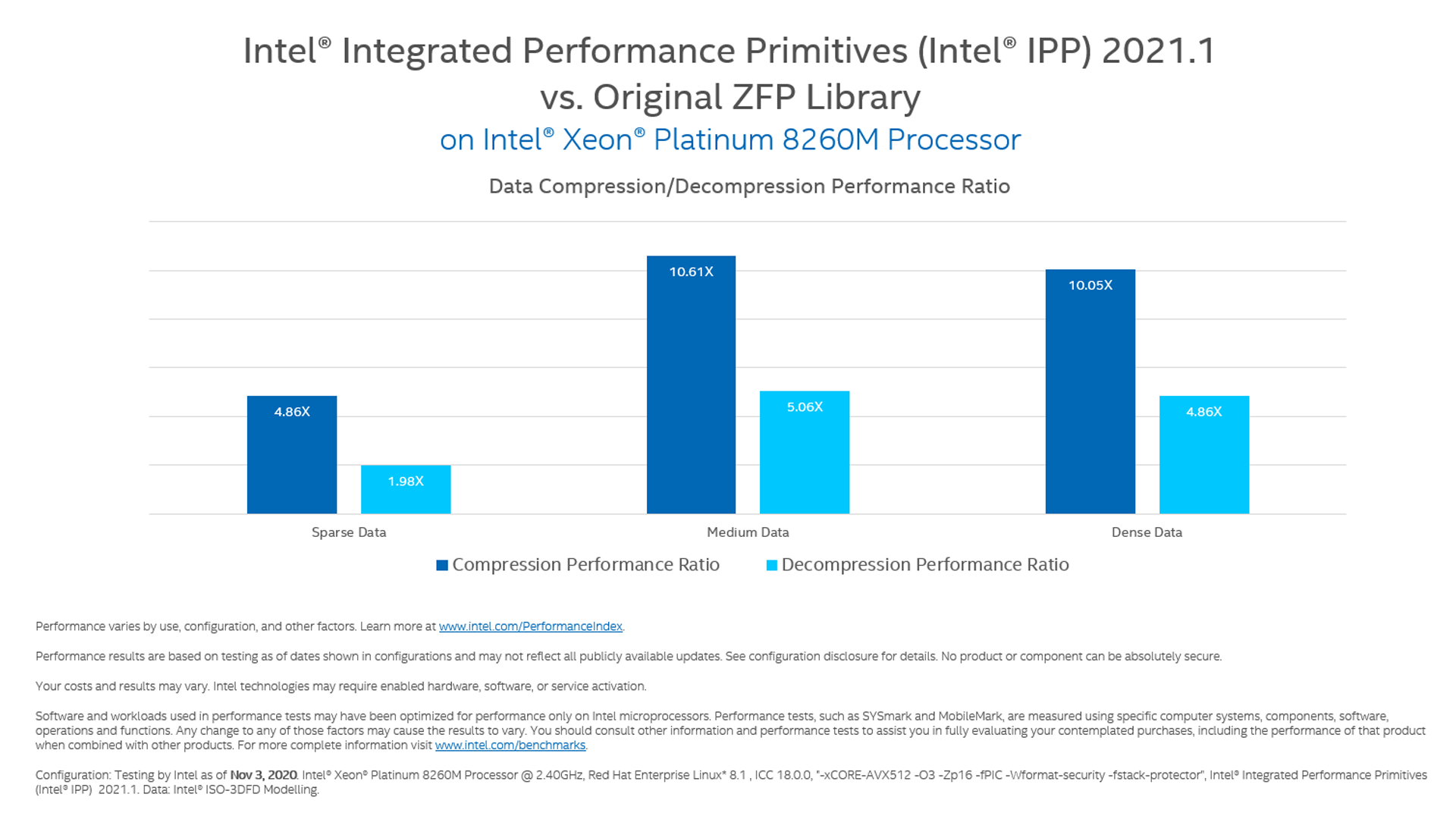
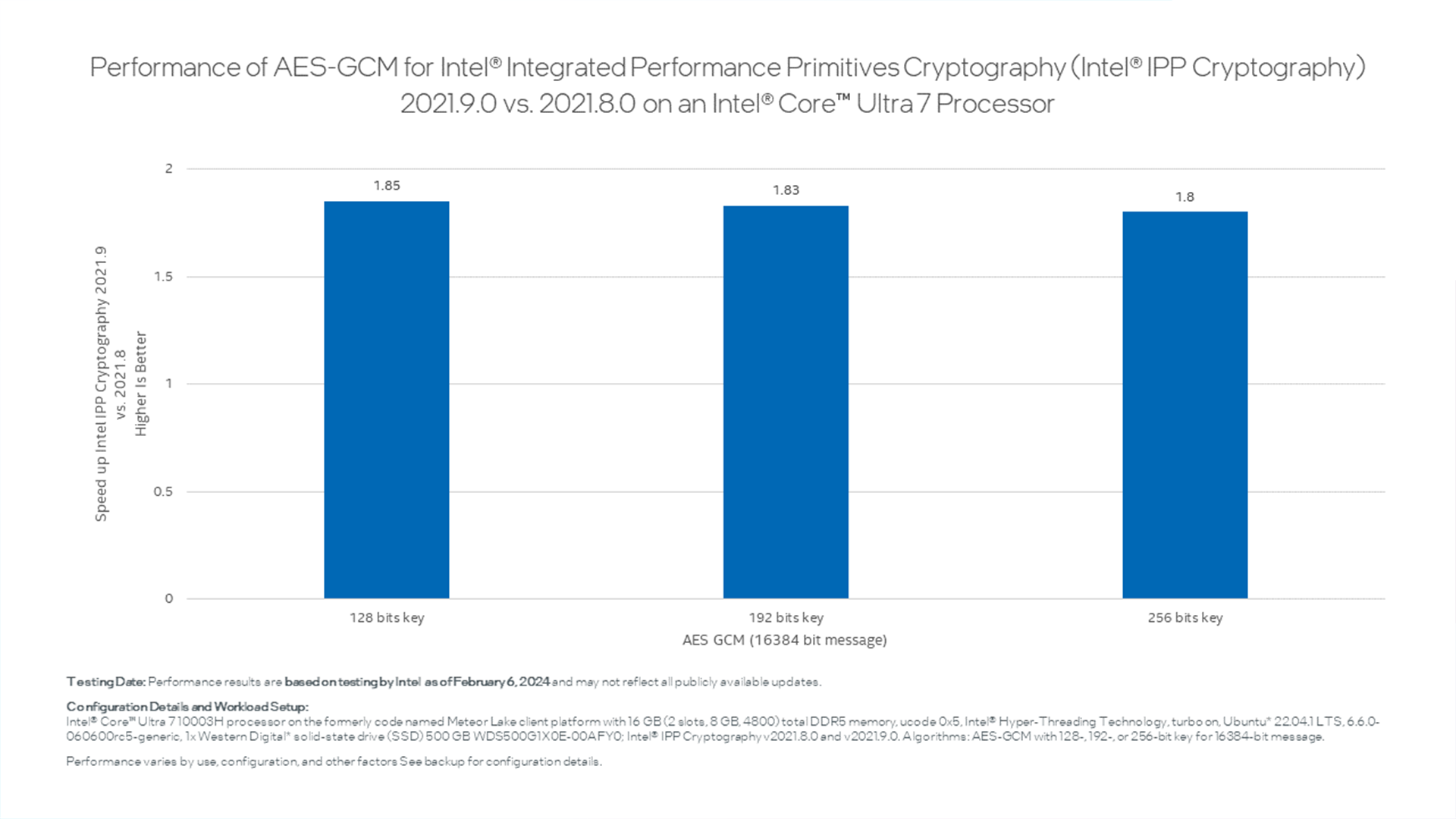
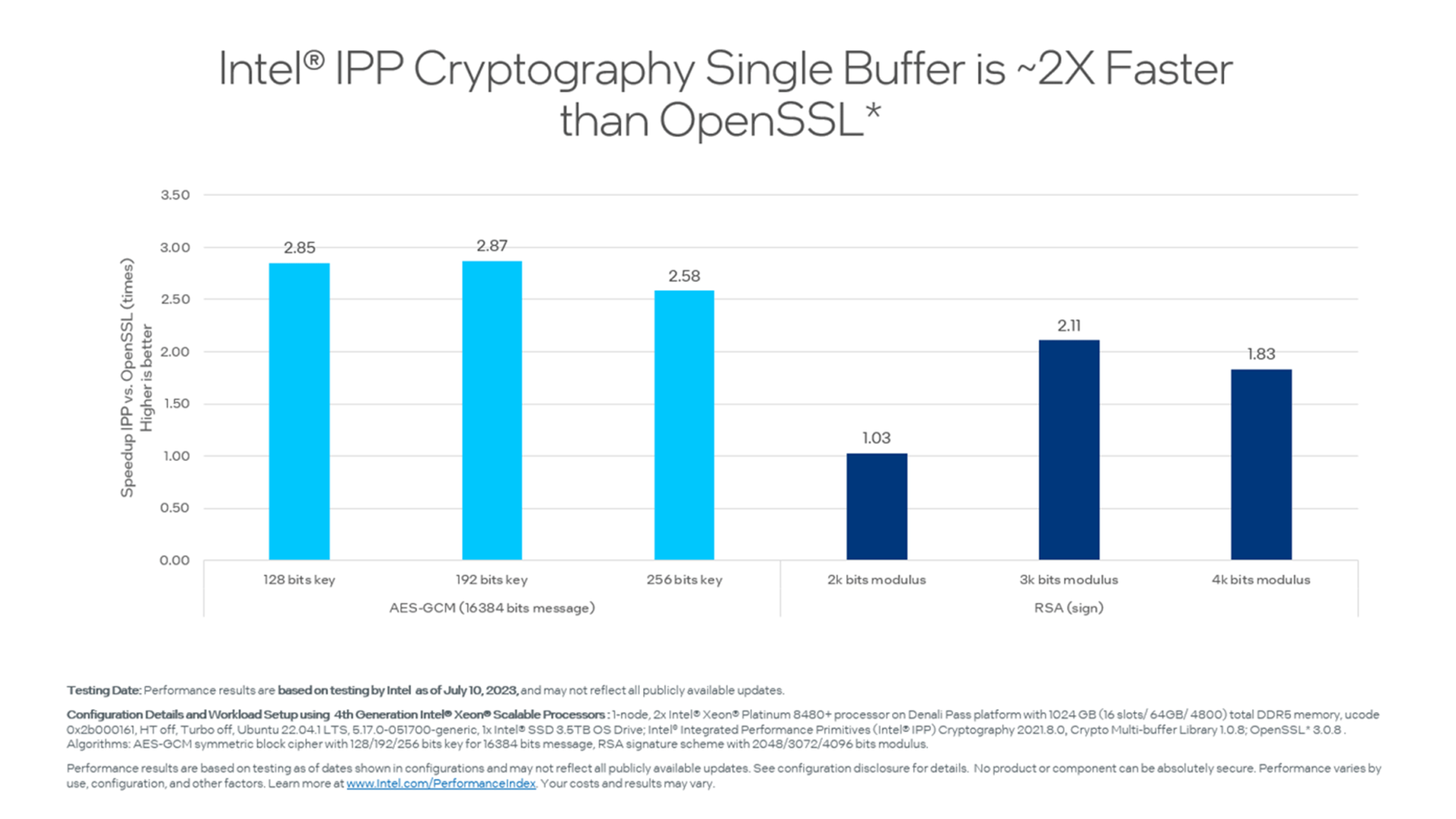
These benchmarks illustrate the performance capabilities of Intel IPP.
Documentation
Cryptography Documentation
- Get Started Guides: Windows | Linux
- Developer Reference
- Developer Guide
Other Development Environments
Solution Briefs
- Tap into Cryptographic Acceleration (requires sign in)
Code Samples
Demonstrations of important features in this release are located in [install-dir]/ipp/latest/share/doc/ipp. Refer to the Developer Guide topic Using Intel IPP Examples.
| Sample | Description |
|---|---|
| Multithread Image Resize | Learn how to use the ippiResize functionality in single and multithread modes. Use the parallel_for loop functionality for external multithreading. The multithreading mode works if the project is built with Intel® oneAPI Threading Building Blocks (oneTBB) support. |
| Image Linear Transform (ipp_fft) |
This example shows how to use two image linear transforms:
|
| External Threading Example (ipp_thread) | Learn about threading for an image harmonization filter. Since internal threading is deprecated, it is important to know how to externally thread a generic Intel IPP function. |
| Cryptography Examples | Learn how to use the Intel IPP cryptography library with a collection of code samples on GitHub that cover:
|
Training Resources
Understanding Intel IPP
- Drive Multimedia and Data-Processing Performance with Multidomain Primitives
- Linkage Models
- CPU Dispatching
Data Compression
Image Processing
Intel IPP Cryptography
- Video: Cryptography Overview for Intel IPP [4:20]
- Advanced Encryption Standard—Galois Counter Mode (AES-GCM) Acceleration
Signal Processing
Case Studies
- Accelerate the XtalPi Drug Discovery Application with Intel® Toolkits
- Meituan* Case Study: 4th Gen Intel® Xeon® Scalable Processors Help Meituan Accelerate Vision AI Inference Services and Optimize Costs
- WeBank* Cryptography Case Study: Accelerate Secure Computing for Federated Learning
- SonoScape* Achieves 20x Performance Increase Using Intel IPP and the Base Kit
Testimonials
Hisense* Adopts the Base Kit to Develop Its New Ultrasound Imaging Application
The Hisense* new ultrasound imaging platform consists of GPUs and CPUs in its computing architecture for ultrasound desktop and portable devices. They not only migrated key CUDA* kernel functions to SYCL* to run on current and future generations of Intel CPUs using the Intel® DPC++ Compatibility Tool, but also simplified programming for their cross-architecture systems. Using Intel® oneAPI Base Toolkit components including the Intel® oneAPI DPC++/C++ Compiler, Intel IPP, Intel® oneAPI Math Kernel Library (oneMKL), and oneTBB has helped in reducing the total post-processing time in the ultrasonic system for signals and images. Intel® toolkits help them simplify their development efforts and deliver better products to their end users.
Johns Hopkins University School of Medicine
Optimization of processing and analysis of fMRI data as shown will help not only with operational efficiency for clinical fMRI but for large-scale research projects, which would benefit significantly from such speed increases while potentially reducing cloud deployment cost by approximately 25%. These optimizations were achieved by using Intel® C++ Compiler Classic, oneMKL, Intel® Performance Primitives library, and Intel® VTune™ Profiler.
Meituan*
"Intel toolkits helped increase our end-to-end application processing performance on Intel® Xeon® platforms. By using oneAPI technology including Intel IPP, which is a set of high-performance software library combined with hardware deep optimization providing a large number of signal processing, image processing and other functions, we were able to significantly improve our image-processing code performance by 2.7x in image rotation, and 4x in image resize. This allows us to analyze larger image datasets, and builds the cutting-edge visual AI Inference solution for our end customers."
Specifications
Processors:
- Intel® Core™ processors
- Intel® Xeon® processors
- Intel Atom® processors
Languages:
- Built-in support for C and C++
Operating systems:
- Windows
- Linux
Development environments:
- Compatible with compilers from vendors that follow platform standards, such as Microsoft*, GNU Compiler Collection (GCC)*, and Intel
- Can be integrated with Microsoft Visual Studio*
License:
End User License Agreement (EULA)
Note Your installed software development products may use a prior version of the EULA.
Get Help
Your success is our success. Access these support resources when you need assistance.
Stay In the Know on All Things CODE
Sign up to receive the latest trends, tutorials, tools, training, and more to
help you write better code optimized for CPUs, GPUs, FPGAs, and other
accelerators—stand-alone or in any combination.