Priority Support for Intel® oneAPI Base & HPC Toolkit
Optimized Tools for Delivering High-Performance, Cross-architecture Applications
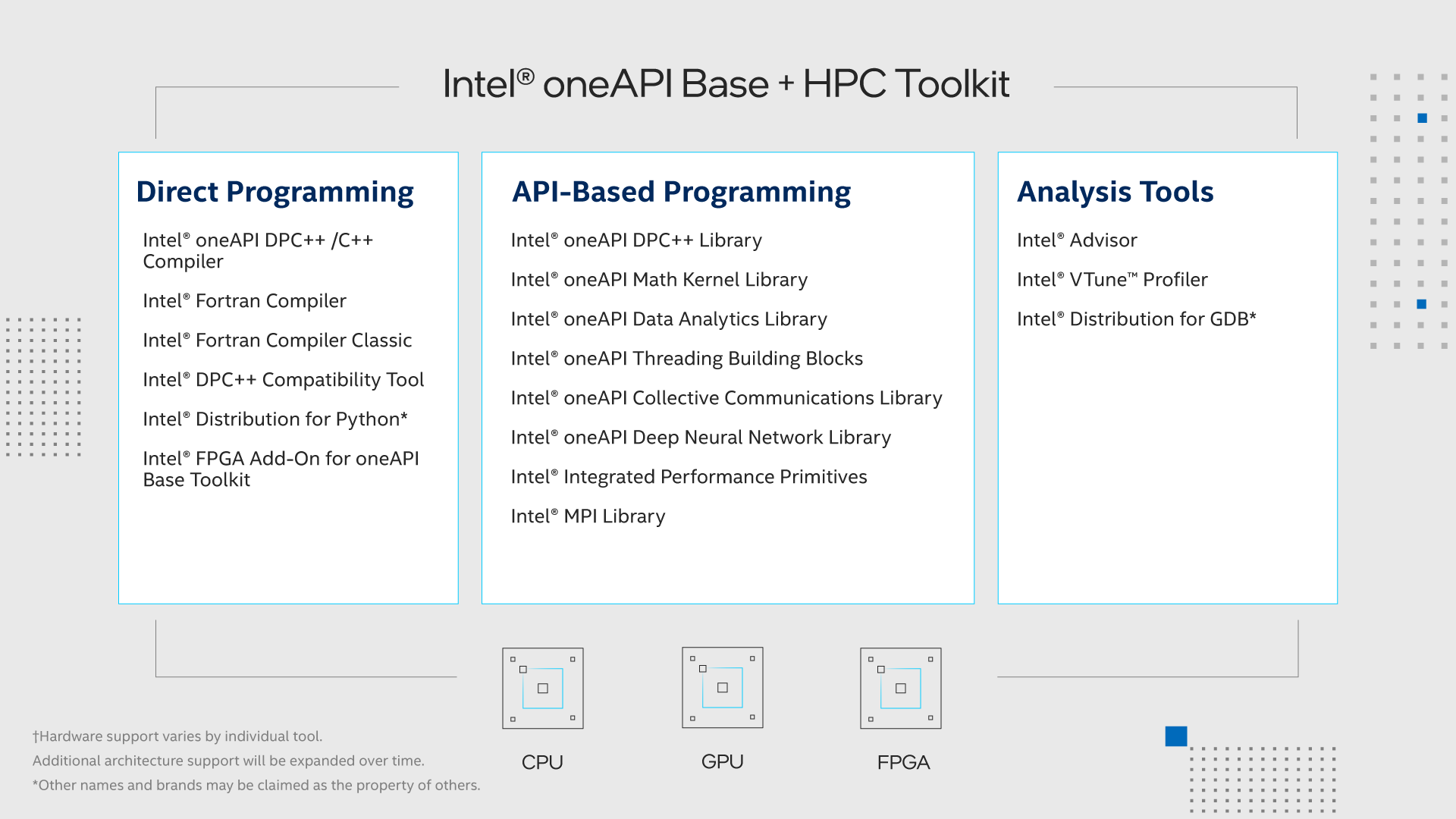
The Intel® oneAPI Base & HPC Toolkit delivers what developers need to build, analyze, optimize, and scale HPC applications. It is a combination of two toolkits:
Intel® oneAPI Base Toolkit
- Includes a core set of tools and libraries to build and deploy data-centric applications across architectures.
- It features support for the SYCL* (from the Khronos* Group) C++ language extension, domain-specific libraries, and enhanced profiling, design, and debug tools.
Intel® HPC Toolkit
- Deliver high-performance computing tools to build, analyze, optimize, and scale AI, machine learning, and deep learning applications.
- Optimized with the latest techniques in vectorization, multithreading, multi-node parallelization, and memory optimization.
"Intel's oneAPI toolkit has demonstrated powerful performance and good compatibility in GeoEast software applications, and has provided us with important help in the further exploration of heterogeneous computing." – BGP Inc.
Benefits
Priority Support is paid product support that covers all of the components included in the toolkit. It provides the following benefits for one year:
- Direct and private interaction with Intel’s support engineers, including the ability to submit confidential support requests
- Accelerated response time for technical questions and other product needs
- Ability to influence product features and quality
- Priority support for escalated defects
- Free download access to all new product updates and continued access to older versions of the product
- Access to a vast library of self-help documentation built from decades of experience in creating high-performance code
- Additional services at reduced cost, including on-site or online training and consultation by Intel technical consulting engineers
Buy Now
Buy a product with support through a number of resellers or directly from the online store. Special pricing for academic research is available. Target platforms for development and deployment require different support efforts. Choose the version that meets your needs.
Version
Intel oneAPI Base & HPC Toolkit (Single-Node)
Target Platform
Shared memory systems: PC, laptop, and workstations
$1,499+
Version
Intel oneAPI Base & HPC Toolkit (Multi-Node)
Target Platform
Shared and distributed memory systems: clusters, PC, laptops, and workstations
$2,949+
What's Inside
Intel® oneAPI Collective Communications Library
Implement optimized communication patterns to distribute deep learning model training across multiple nodes.
Intel® oneAPI Data Analytics Library
Boost machine learning and data analytics performance.
Intel® oneAPI DPC++/C++ Compiler
Compile and optimize SYCL and C++ code for CPU, GPU, and FPGA target architectures.
Intel® oneAPI DPC++ Library
Speed up data parallel workloads with these key productivity algorithms and functions.
Intel® oneAPI Deep Neural Network Library
Develop fast neural networks on Intel® CPUs and GPUs with performance-optimized building blocks.
Intel® oneAPI Math Kernel Library
Accelerate math processing routines, including matrix algebra, fast Fourier transforms (FFT), and vector math.
Intel® oneAPI Threading Building Blocks
Simplify parallelism with this advanced threading and memory-management template library.
Intel® Video Processing Library (separate download required)
Deliver fast, high-quality, real-time video decoding, encoding, transcoding, and processing for broadcasting, live streaming and video on demand (VOD), cloud gaming, and more.
Intel® Advisor
Design code for efficient vectorization, threading, and offloading to accelerators.
Intel® Distribution for GDB*
Enable deep, system-wide debug of SYCL, C, C++, and Fortran code.
Intel® Distribution for Python* (separate download required)
Achieve fast math-intensive workload performance without code changes for data science and machine learning problems.
Intel® DPC++ Compatibility Tool
Migrate legacy CUDA* code to a multiplatform program in SYCL code with this assistant.
Intel® Fortran Compiler
Use this standards-based Fortran compiler with OpenMP support for CPU and GPU offload.
Intel® Fortran Compiler Classic
This standards-based Fortran compiler includes support for OpenMP that provides continuity with existing CPU-focused workflows.
Intel® FPGA Add-On for oneAPI Base Toolkit (Optional)
Program these reconfigurable hardware accelerators to speed up specialized, data-centric workloads. Requires installation of the Intel® oneAPI Base Toolkit.
Intel® Integrated Performance Primitives
Speed up performance of imaging, signal processing, data compression, and more.
Intel® MPI Library
Deliver flexible, efficient, scalable cluster messaging on Intel® architecture.
Intel® VTune™ Profiler
Find and optimize performance bottlenecks across CPU, GPU, and FPGA systems.
Related Products
The following Intel toolkits are also available with paid product support.
Intel oneAPI Base Toolkit
Optimized tools for performance-driven, cross-architecture application
Intel® oneAPI Base & Rendering Toolkit
Powerful libraries and tools for high-fidelity rendering and visualization applications
Support
Your success is our success. Access these support resources when you need assistance.
Priority Support
Register your product, submit a request, and more.
Intel® Parallel Studio XE Users
Intel toolkits are the next generation of standards-based toolkits used to build and deploy high-performance, data-centric applications across diverse architectures. The transition from Intel® Parallel Studio XE to Intel toolkits delivers additional capabilities through existing tools and new tools. The following information shows Intel Parallel Studio XE Editions and the equivalent Intel oneAPI Base & HPC Toolkit products.
Intel® Parallel Studio XE Product |
Intel® Toolkit Product |
|---|---|
Intel® Parallel Studio XE Composer Edition Intel® Parallel Studio XE Professional Edition |
Intel® oneAPI Base & HPC Toolkit (Single-Node) |
| Intel® Parallel Studio XE Cluster Edition | Intel® oneAPI Base & HPC Toolkit (Multi-Node) |
Support
Customers currently using Intel Parallel Studio XE (Composer, Professional, or Cluster Editions) and who are on active software support will continue to receive support through the term of the active support period. Support will apply to the Intel oneAPI Base & HPC Toolkit that will be provided as the next generation of the Intel Parallel Studio XE suite of tools. Available versions of Intel Parallel Studio XE entitled to you will remain available in your account on the Intel Registration Center.
Software Updates
All software updates and latest versions for Intel Parallel Studio XE tools will be delivered in the Intel oneAPI Base & HPC Toolkit. Customers on active software support will be able to upgrade to the Intel oneAPI Base & HPC Toolkit by signing into the Intel Registration Center and accepting the upgrade. You will receive an email that explains these changes and a link to the Intel Registration Center to upgrade. Support will continue through the term of the current active support period for the Intel oneAPI Base & HPC Toolkit.
Licensing
Existing software license files continue to be available in the Intel Registration Center and enable your use of Intel® Software Product versions you are entitled to. The Intel toolkits do not require license files, and the terms of use are based on the purchased product with support and End User License Agreement.
Stay In the Know on All Things CODE
Sign up to receive the latest trends, tutorials, tools, training, and more to
help you write better code optimized for CPUs, GPUs, FPGAs, and other
accelerators—stand-alone or in any combination.